Enforcing Website Terms & Conditions
Summary
- A click-wrap agreement is a digital contract that users accept by clicking a button or checking a box. Instead of a traditional signature, a click (or similar action) indicates consent to the terms.
- These agreements are widely used on websites and mobile apps for things like:
- Terms of Service: The rules for using a platform.
- Privacy Policies: How your data is collected and used.
- End-User License Agreements (EULAs): The legal right to use software.
- Online Purchases: Agreeing to the sale's terms and conditions.
- IMPLEMENTATION: Discuss implementation with the technicians who maintain the website
Key Characteristics
- Informed Consent: To be legally enforceable, the terms must be easily accessible to the user, typically through a hyperlink, before they click "I agree."
- Affirmative Action: The user must take a deliberate action, such as clicking a button or checking a box, to show they agree. Passive actions like continuing to use the site (known as browsewrap agreements) are generally not as legally sound.
- Record-Keeping: The company must keep a record of the user's acceptance, including the date, time, and version of the terms they agreed to. This is crucial if a legal dispute arises.
Main Advantage
- The main advantage of clickwrap agreements is their efficiency and scalability. They allow companies to quickly and securely enter into legal agreements with millions of users without the need for physical paperwork.
- It is not enough to include a static text in a registration or check that reads "by clicking below you agree to our terms". You will actually need a hyperlink to a separate page containing the terms so that they can be updated as needed.
- The website should include a version control feature that creates a record of which version of the agreement was accepted when the user clicked the box indicating acceptance and the ability to recapture consent after agreements are updated
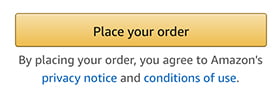
- It is ideal to renew the contract agreement at every new purchase or transaction to make absolutely sure that each transaction is covered by your legal terms. This can be achieved with a simple "you agree" statement right below the 'Place your order' button as shown below
- Request renewed acceptance whenever the agreements are updated or changed. For example AirBnb requires each member to agree to the revised terms before they can access their account:
- Hyperlink
- Create a hyperlink allowing the users to read the terms and conditions on a separate web page which can be update when necessary.
- Scroll box
- The site can include the click wrap agreement in a scroll box for users to tick a box as acceptance.
- Users must scroll through the terms and conditions before they’re able to tick the box.
- Display the agreement in a clear way before letting people access your site, app, or software
- Make them agree to the terms before giving them the chance to register or create an account
- Have customers agree to terms before making a purchase
- Remove any questions about whether someone is agreeing or disagreeing to the agreement
- Tell people that agreeing to the terms creates a legal contract
- Put up a dialog box if people try to use your site without clicking to agree to the terms, notifying them they can't continue
Types of evidence needed to enforce clickwrap agreements
- Screenshots: A screenshot is an image that displays what a screen looked like at the time of signing. Courts often rule in favor of terms on a page designed to provide actual or inquiry notice to a user. As a result, if the screen design is poor, the screenshot tends to sway the court towards not enforcing the terms. On the other hand, if the screenshot shows that the screen is optimally designed, the court is highly likely to rule in favor of enforcing the terms.
- Affidavit/declaration from key personnel: Affidavits or declarations are written statements or sworn testimony from key personnel familiar with the contract acceptance process. A declaration is more likely to be successful when the person providing it has pertinent knowledge of the system being described and/or is in a role that familiarizes them with the contract acceptance process.
- Back-end records of acceptance: Back-end records are records that contain data captured at the time of contract acceptance. This data indicates who accepted an agreement, when the agreement was accepted, and what version of the agreement that was live at the time of acceptance. When used as evidence to try to compel arbitration, back-end records are most successful when they showcase specificity and a high level of detail - that is, that a particular user signed a particular agreement at a particular time
Where to Post the Terms and Conditions
Once created the terms and conditions agreement should be displayed in a prominent area of the website or app. Here are the top six places to put your terms and conditions:
- Inside Current Legal Policies
- Informational Menus or Sections
- Website Footer
- Banners and Pop-Ups
- During Sign-Up
- During Checkout
Link your terms and conditions in other legal documents on your site, such as your End-User License Agreement (EULA) or privacy policy.
Since users typically read all of your site's legal notices in one go, these links will make it easier for them to understand what they're agreeing to by joining your site.
Placing your terms and conditions in informational menus and sections throughout your site will remind users that they can read your terms and conditions at any time. It will also make it easier for them to access your website's terms and conditions as needed.
Most companies put their terms and conditions in the footers of their sites. So that's where visitors typically expect to see a link to your site's terms and conditions.
You should also put a link to your terms and conditions on a pop-up or banner that appears whenever users access your site for the first time.
This placement will give you an advantage in the event of a legal dispute because you can demonstrate that you showed the user your website terms and conditions before they started using your service.
Another great place to link to your terms and conditions agreement is during the sign-up process.
As with banners and pop-ups, placing a link to your terms and conditions during the sign-up process will give you an advantage in court.
Last but not least, you should link your terms and conditions during checkout. Doing so will shield you from legal and financial risk, particularly if your terms and conditions have detailed pricing disclosure and site support clauses.
For example, let's say you run a laptop store and accidentally send a customer the wrong item. You can point to your site support clause to cancel the order to avoid miscommunications and liabilities.